
Support that arrives in their DMs.
Members message the bot. Staff answer from your server. Ranked staff tiers, saved replies, transcripts and auto-close are already built in.
Free. No paid version and no locked features.
The bot carries messages both ways
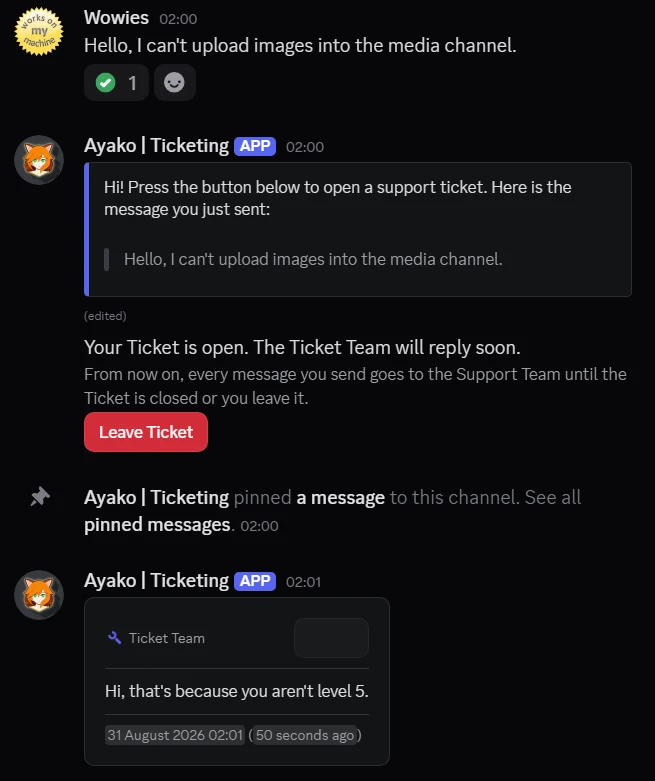
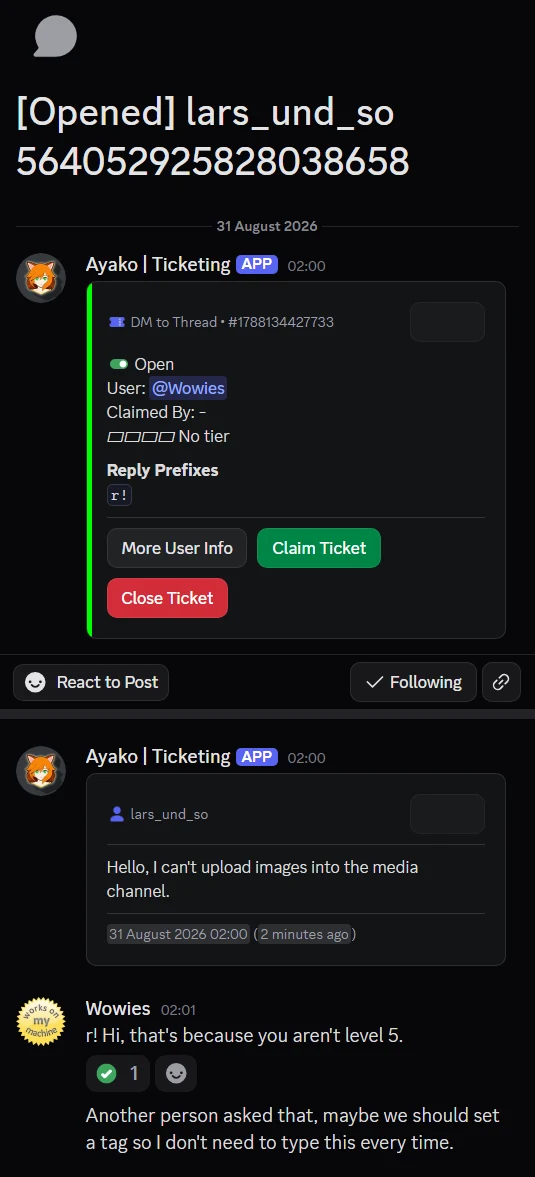
The member stays in their DMs. The bot copies the whole conversation into a staff channel. A prefix on each staff message decides: send it to the member, or keep it as a private note.
Take it back by editing it
Edit a sent message and remove the prefix. The bot deletes the member’s copy and removes the check mark.
The ticket really moves up
When a ticket goes up a tier, the bot moves it. The channel moves into that tier’s category and takes its permissions. Or the forum tag changes. Or a new thread starts, and the old one is locked, saved as a transcript, and archived.
No moderation permissions
It asks for 13 permissions, and they cover only channels, threads, messages and roles. Your server can run a support desk without giving the bot any moderation power.
One ticket, from start to end
opened, claimed, moved up, warned when it went quiet, closed. the transcript is sent only when the ticket is deleted
A ticket does not have to be a channel
4 shapes, and every ticket system picks its own. 2 of them keep the member in their DMs the whole time.
Channel
One channel per ticket, under a category you choose. The channel takes its permissions from that category. When a ticket moves up, the new category’s permissions apply.
Private staff thread available
Thread
A private thread inside a channel you already have. Your channel list stays the same, and you set the archive time.
Private staff thread available
DM → Thread
The member writes to the bot in their DMs and never sees your server. The bot copies every message into a private thread, and staff reply from there with a prefix.
The member needs no channel access
DM → Channel
The same as DM → Thread, but the messages go to a full channel instead. The ticket shows in your channel list, and the member still stays in their DMs.
The member needs no channel access
Two places, one conversation
The member sees a direct message. Your team sees a staff channel. The bot sits between them, and you control what the member sees.
The prefix is the switch
Start a message with one of your prefixes, and the bot sends it to the member with the prefix removed. Write without a prefix, and the message stays in the ticket as a private note.
A check mark you can trust
When a message reaches the member, the bot puts a check mark under it. No check mark means the member did not get that message.
Edit a message to take it back
Remove the prefix from a message you already sent, and the bot deletes the member’s copy and the check mark. Edit the text instead, and the bot edits their copy to match.
Notes always go into the ticket
If staff reply without a prefix outside the ticket channel, the bot copies that reply into the ticket as a private note. The whole conversation stays in one place.
You choose the prefixes. If the list is empty, every staff message goes to the member.
Tickets move up through tiers you create
A tier is a row you create: a name, a rank, the roles that can claim it, where its tickets go, and how long a ticket may wait there. When a ticket moves up, the bot moves it into the new tier’s category, channel or forum tag.
- Rank 1
First line
The roles that can claim, the place its tickets go, and its own reminder timer.
- Rank 2
Senior staff
When a ticket moves up, it goes into this tier’s category, channel or forum tag.
- Rank 3
Leads
The ticket takes its permissions from where it goes. You set them once for each tier.
- Rank n
Add as many as you want
A tier is just a row in your settings. Add one more, and the menu grows with it.
another staff member can take a claimed ticket only if you allow take-over, and only if their tier rank is higher
The parts only staff ever see
One saved reply, two texts
A snippet is a saved reply with two texts: one for the member and one for staff. One shortcut sends the answer to the member and a note to the team at the same time. The bot fills in these placeholders before it sends anything:
{{user}}{{staff}}{{claimer}}{{server}}{{kind}}{{ticket}}A private space for the team
Turn staff threads on, and every new ticket also opens a private thread for the team. Staff can agree on an answer there before anyone sends it. The thread can sit on the ticket itself or on one channel you choose.
Channel and Thread tickets only. A DM ticket has no channel in your server, so there is nothing to attach a thread to.
Everything it does
- Thread and DM ticket shapes: a private thread in a channel you already have, or a DM conversation the bot copies into one.
- Staff replies with a prefix: a prefix you choose decides for each message: send it to the member, or keep it as a private note.
- Take a message back by editing it: remove the prefix from a sent message, and the bot deletes the member’s copy and the check mark.
- Ranked staff tiers: each tier has its own name, rank, claim roles, target category or channel, and reminder timer.
- Take-over by rank: another staff member can take a claimed ticket only when you turn take-over on and their tier rank is higher than the claimer’s.
- Snippets with 2 texts: one saved reply with a text for the member and a text for staff, using {{user}}, {{staff}}, {{claimer}}, {{server}}, {{kind}} and {{ticket}}.
- Private staff threads: a private thread next to the ticket, just for the team, on Channel and Thread tickets. A DM ticket has no channel in your server to hold one.
- Transcripts when a ticket is deleted: when a ticket is deleted, the bot builds a transcript from everything it saw and sends it to the channels you choose.
- 10 logged ticket events: a ticket being created, claimed, closed, left or deleted (normally or in an unusual way), plus 4 message events, sent to a log channel or a log thread.
- Warn first, then close: when a ticket goes quiet, the bot sends a warning first. Only after that warning does the close timer start.
- Unclaimed and stale reminders: 2 separate reminders: one for tickets nobody claimed, one for claimed tickets that went quiet. Each has its own wait time and repeat time, and pings only the roles and users you list.
- Per-member ticket limits: a limit on how many open tickets one member can have, in total and per ticket shape.
- 2 placement modes: separate places per tier, or one shared forum where moving a ticket up only changes its tag.
- Deny lists: roles and users that cannot open a ticket. The bot checks this before it creates anything.
- Panel messages: a button in a channel you pick that opens a ticket, with your own embed and your own label.
- Custom bot identity, per ticket system: a ticket system can run under its own bot token, name, avatar and status. Systems that share a token share a profile.
It warns first, then it closes
4 timers watch each ticket, and all of them are off until you set a time. The close timer starts only after the warning.
remind-unclaimed Unclaimed
Runs when nobody has claimed a ticket, and repeats on the timer you set.
remind-stale Stale
Runs when a claimed ticket goes quiet, and repeats until someone takes action.
inactivity-warn Inactivity warning
Tells the member and the channel that the ticket will close, and says when.
inactivity-close Inactivity close
Starts only after the warning above. No warning time set, no automatic close.
13 permissions. No moderation power.
This bot is Ayako’s ticket system, on its own. The list below is everything it asks for.
- 01 View Channel
- 02 Manage Channels
- 03 Manage Roles
- 04 Manage Threads
- 05 Manage Messages
- 06 Send Messages
- 07 Send Messages in Threads
- 08 Create Public Threads
- 09 Create Private Threads
- 10 Embed Links
- 11 Attach Files
- 12 Read Message History
- 13 Add Reactions
- – Ban Members
- – Kick Members
- – Moderate Members
the main Ayako bot needs those. a support desk does not.
What people want to know
Is Ayako | Ticketing really free?
Yes. There is no paid version, no trial, and no locked features, the same answer the main Ayako bot gives. The code has no payment check at all, because there is nothing to pay for.
Can members open a ticket without joining a channel?
Yes, that is what the 2 DM shapes are for. The member has the whole conversation in their direct messages with the bot. Staff read and answer from a thread or a channel in your server. The member never sees that channel and never needs access to it.
What happens to a ticket nobody claims?
The bot sends a reminder after the wait time you set, and repeats it on its own timer. It pings only the roles and users on your list. A second reminder covers tickets that are claimed but quiet. Both are off until you set a time.
Are ticket transcripts saved?
Yes. The bot sends the transcript when a ticket is deleted. Until then, you can still reopen a closed ticket and read it where it is. The transcript is built from everything the bot saw, and each entry has a label that says what happened: created, forwarded, internal, claimed, unclaimed, escalated, left and closed.
Does it work for large servers?
It has tools made for busy servers. You can limit how many open tickets one member can have, in total and per shape. Deny lists stop the roles and users you choose. Each tier sends its tickets to its own place. And in forum mode, a busy desk is 1 forum instead of 100 channels.
Let your members open tickets from their DMs
Ayako | Ticketing is free. Members stay in their DMs, and your team answers from your server.