
Why can’t they post here?
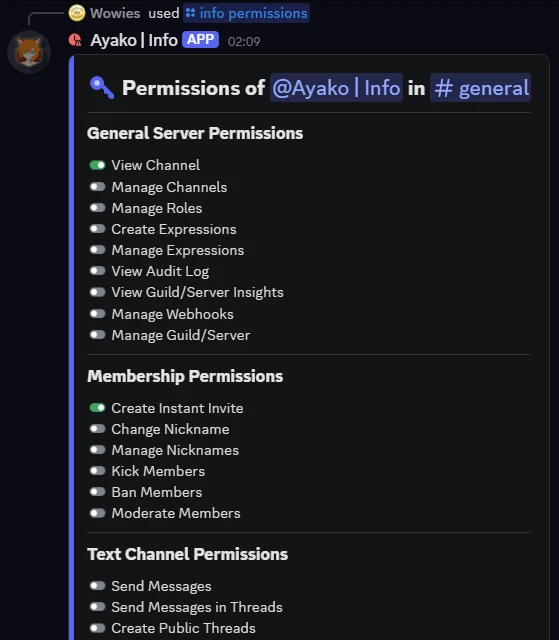
One /info command looks up any user, server, role, channel or message. It calculates permissions the same way Discord does, with channel overwrites and timeouts included.
The real permissions, all 6 layers
The bot checks 6 layers in the same order Discord does: owner, the @everyone role, the member’s roles, then the channel overwrites for @everyone, for roles, and for the member. It also checks timeouts, so a member in timeout correctly shows Send Messages as denied.
Pick a channel from the answer
/info user and /info role come with a channel picker. Choose a channel and the bot works out that member’s or role’s permissions there, without running the command again.
One command for everything with an ID
User, server, channel, role, emoji, sticker, invite, webhook, AutoMod, scheduled events, soundboard, and more.
4 permissions. Read-only. No setup.
View Channel, Send Messages, Embed Links, Read Message History. The settings list is empty, because there is nothing to set up.
6 layers, checked in order
this is the whole product
Fig. 1: the 6 layers, in the same order the bot checks them.
- 01 The server owner
The server owner always has every permission. For the owner, the check stops here.
- 02 The @everyone role
Every member starts with the permissions of the @everyone role.
- 03 The member’s roles
Each role the member has adds its permissions. A role with Administrator gives every permission, and the check stops here.
- 04 The @everyone channel overwrite
Now the channel’s own rules start. The overwrite for @everyone removes its denied permissions first, then adds its allowed ones.
- 05 The role channel overwrites
The bot joins all role overwrites for this channel into one. This one also removes denied permissions first, then adds allowed ones.
- 06 The member channel overwrite
An overwrite set for this one member comes last. It wins over every layer above.
Then the timeout mask. If the member has an active timeout, the bot applies it on top of the final result. So a member in timeout shows Send Messages as denied. A menu under the answer lets you pick another channel, and the bot shows all 47 permissions there without running the command again.
One command, 17 subcommands
Every subcommand of /info. You can post each answer in the channel, or see it only for yourself.
- 01 /info user Information about a user.
- 02 /info avatar The avatar of a user.
- 03 /info banner The banner of a user.
- 04 /info server Information about a server the bot is already in.
- 05 /info channel Information about a channel.
- 06 /info role Information about a role.
- 07 /info emoji Information about an emoji, or the whole emoji list.
- 08 /info sticker Information about a sticker, or the whole sticker list.
- 09 /info invite Information about an invite link or code.
- 10 /info bot Information about this bot.
- 11 /info badges The Discord badges that members of this server have.
- 12 /info servers Every server this bot is in.
- 13 /info events The scheduled events of this server.
- 14 /info webhook Information about a webhook, from its URL.
- 15 /info automod The auto-moderation rules of this server.
- 16 /info soundboard The soundboard sounds of this server.
- 17 /info permissions The permissions of a user or role, for the whole server or for one channel.
What the message actually said
the message, and the message before that
see #rules befor posting
see #rules before posting
see #rules before posting, thanks!
Which badges your members have
/info badges counts 14 Discord badges across up to 3,000 cached members. It also shows you how many members it checked.
14 badges, up to 3,000 cached members, and it always shows how many it checked
4 permissions, and a long list of things it can never do
- View Channel to see the channel where you run the command
- Send Messages to answer
- Embed Links to answer with a clean embed
- Read Message History to find the message you right-clicked
That is the full list. The settings list is empty, so there is no setup step, no dashboard page, and the bot saves nothing for you.
- Ban, kick or time out anyone
- Delete, edit or moderate a message
- Create or change a role, channel or webhook
- Save any settings (the settings list is empty)
- Work in DMs, or install on a user account
- Look up a server it is not in
The bot does not check who is asking. Any member who can use /info permissions can use it on anyone. There is one exception: the bot hides a channel's topic from people who cannot view that channel.
Discord already has the right tool for this, and it is the way we recommend you manage it. Open Server Settings → Integrations → Ayako | Info, and you can allow or block each command for any role, member or channel. Discord checks those rules before the command ever reaches the bot, so nothing depends on the bot behaving.
Questions people ask
Why are this member’s permissions different from their role?
Because a role is only layer 3 of 6. Three channel overwrites come after it: for @everyone, for roles, and for this member. An active timeout can also change the result. The panel shows the final answer for the channel you picked.
Does it work on users who left the server?
Yes. If the user is not in the bot’s cache, the bot asks Discord directly, so a plain user ID is enough. But some data only exists for members: roles, join date, and channel permissions. For that data, the user must still be in the server.
Can I see what a message said before it was edited?
Usually. Right-click a message and choose Message History. You see the versions the bot saw in the last 14 days, and only from the time the bot was online. Older versions, and edits made while the bot was offline, are missing.
What permissions does it need?
It needs 4: View Channel, Send Messages, Embed Links and Read Message History. That is the full list. All 4 are for reading and answering.
Stop guessing why a permission works that way
Ayako | Info reads your server and gives you the answer. It changes nothing, saves nothing, and asks for 4 permissions.
Read-only. 4 permissions. Nothing to set up.