Cookie Consent by Free Privacy Policy Generator Ayako | Confessions: a confession channel on your terms
Plate V · The Locket

Confessions, on your server's terms

Members write a confession, and the bot posts it without their name. You decide whether staff can still see who wrote it, and whether it waits for review first.

Add Confessions to Discord

4 permissions. No dashboard. Free.

You choose how private it is

Hidden lets staff see who wrote it. Anonymous stores no Discord user ID, so nobody on the server can find out through the bot who sent it.

Three ways to moderate

Review holds every confession until a reviewer decides. Screened runs the text through your own Discord AutoMod rules and only holds what they flag. Direct posts straight away.

Replies, also without a name

A Reply button under each confession opens a form. The reply is posted without a name and goes through the same rules and the same moderation mode as the confession.

Cooldowns, limits and bans

A cooldown between confessions, a daily limit, minimum account age and time in the server, blocked roles and members. Reviewers can ban authors for a set time or permanently.

2 Anonymity modes
3 Moderation modes
4 Permissions asked
0 Paid features
Figure 1 · The Clasp

First, decide who can see the author

hidden is the default

Every confession is posted without the author's name. The difference between the two modes is what the bot keeps, and who on the server can still find out.

Hidden, the default

  • Staff can see who wrote it, and other members see only the text.
  • Reviewers can press Reveal author on a pending confession.
  • The log channel, if you set one, names the author.
  • A rejected author is told by DM, with your reason if you give one. Image links are allowed only in this mode.

Anonymous

  • The bot stores no Discord user ID for the confession.
  • Nobody on the server can find out through the bot who sent it. The review card has no Reveal author button.
  • Bans, cooldowns, daily limits and deleting your own still work, through a per-server pseudonym.
  • The log channel says Anonymous, and image links are not available.

Choose the mode before you switch confessions on. Confessions sent in Hidden mode keep their author stored even if you move to Anonymous later.

Figure 2 · The Letter Box

What a member can do

Everything happens inside Discord, through one command and the buttons under each post. The form itself tells the member which mode your server uses.

  1. 01

    Send one

    Run /confess, or press Submit a confession under any post. A form opens. The text field takes 10 to 3800 characters by default, and the server can change that within 1 to 3800.

  2. 02

    Reply to one

    Press Reply under a confession and write it in the form. It lands in the confession’s thread if there is one, otherwise as a Discord reply to the confession. Replies are not numbered.

  3. 03

    Delete your own

    Open the ⋯ menu on a confession you wrote and delete it. This works in Anonymous mode too, because the bot keeps a per-server pseudonym for that.

  4. 04

    Report one

    Anyone else who opens the ⋯ menu gets a report form. Write a reason and it goes to the review channel with your name on it.

Figure 3 · The Sorting Table

Decide how much gets checked first

Every mode needs a review channel, because reports land there too. What changes between the modes is how many confessions wait in it.

Review

Every confession and every reply waits in the review channel until a reviewer approves or rejects it. This is the default.

Screened

The text is checked against your server’s own Discord AutoMod rules. Only flagged ones wait for review, and the review card shows how AutoMod saw it. The rest post straight away.

Direct

Confessions post right away. Reports still go to the review channel, and reviewers can still ban an author from the ⋯ menu on any post.

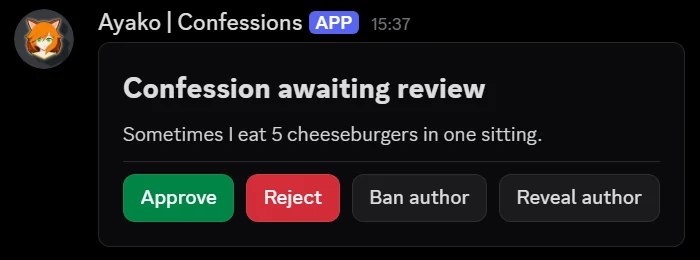
A review card in Discord titled Confession awaiting review. It shows the confession text and four buttons: Approve, Reject, Ban author and Reveal author.
A confession waiting in the review channel of a server in Hidden mode. It posts only after a reviewer presses Approve.
What a reviewer can do
  • Approve, and it posts. Each confession is handled once.
  • Reject, with an optional reason. In Hidden mode the author gets it by DM.
  • Ban author, with an optional reason and a duration such as 7d or 2 weeks. Empty means permanent, and a ban also rejects the confession.
  • Reveal author, in Hidden mode only. In Anonymous mode the card has no such button.
  • From the ⋯ menu on any posted confession: Ban author and Report confession.

Reviewers are the members with the reviewer roles you choose. If you choose none, anyone with Manage Messages counts. /confession-bans lists current bans, five per page, each with a Lift ban button.

Figure 4 · The Mounting Sheet

How each confession is posted

Every post gets a random accent colour. The rest is yours to set.

Text, announcement or forum

Post to any of the three kinds of channel. In a forum, each confession becomes its own post.

A thread under each one

Switch it on and the bot opens a discussion thread under every confession. Replies land in that thread.

Numbered when posted

Confession #12, and so on, by default. A number is given only when a confession is actually posted, so a rejected one never uses a number up.

An optional posting delay

Set a maximum wait and the bot picks a random time up to it, so the moment a confession appears does not match the moment it was sent.

Auto-delete after a set time

If you set a time, the bot removes each post once that time has passed.

Mentions never ping

A member can type @everyone, a role or another member into a confession, and nobody is notified.

Figure 5 · The Frame

The post can look like your server

The default post is a Components-V2 message. You can also pick a design saved with Ayako’s embed builder or Components-V2 builder. This bot does not include the builders itself, so make the design with one of our bots that does, such as Ayako | Welcome. The bot’s buttons go underneath.

{{confession}} The text the member wrote
{{number}} The confession’s number
{{server}} Your server’s name
{{serverid}} The ID of your server
{{servericon}} A link to your server icon
{{boostcount}} How many boosts your server has
{{boosttier}} The boost tier of your server
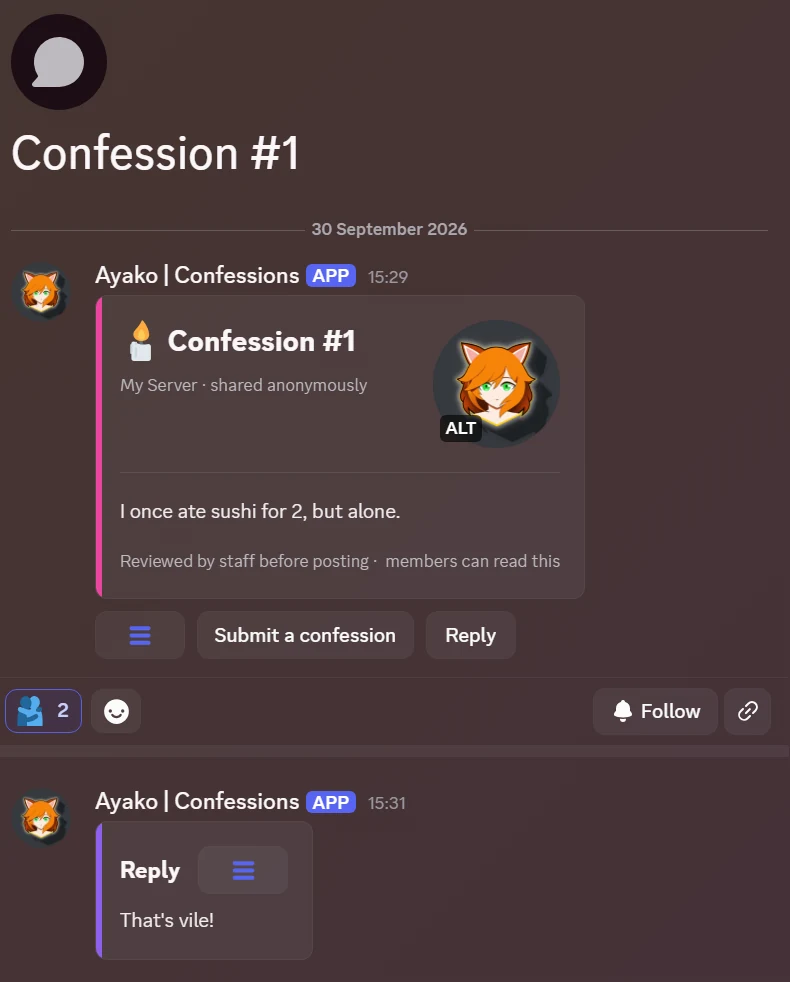
A confession as Discord shows it, in a forum post titled Confession #1. A pink bar runs down a card with the heading Confession #1, the line My Server, shared anonymously, a round picture and the confession text. Below the card are a menu button, Submit a confession and Reply. Further down is a reply with no name on it.
One saved design, posted as its own post in a forum channel, with a reply under it. The design is the server’s own, and the bot adds the buttons underneath.
Figure 6 · The Potting Bench

Five steps, all inside Discord

Open /settings automation confessions. You need Manage Server, and the bot is English only.

  1. 01 Pick the confessions channel: text, announcement or forum.
  2. 02 Pick the review channel. Reports land there in every mode.
  3. 03 Choose the anonymity mode, Hidden or Anonymous.
  4. 04 Choose the moderation mode: Review, Screened or Direct.
  5. 05 Switch confessions on.
Rules you can set
  • A cooldown between confessions, 5 minutes by default, shared with replies
  • A minimum account age
  • A minimum time in the server
  • A minimum and a maximum length, within 1 to 3800 characters
  • A maximum number of confessions per day, unlimited by default
  • Blocked roles
  • Blocked members
Marginalia

Questions people ask

Can staff see who wrote a confession?

Other members cannot see the author in either mode. In Hidden mode, reviewers can press Reveal author on a pending confession, and if you set a log channel, the log names the author of every logged confession. In Anonymous mode the bot stores no Discord user ID for it, the review card has no Reveal author button, and the log says Anonymous.

Can members post images?

Only if you allow it, and only in Hidden mode. It is off by default. When it is on, a member can paste one https link to a png, jpg, jpeg, gif or webp image into the form. It is a link field, so there is no upload.

What stops people from spamming it?

A cooldown between confessions, 5 minutes by default and shared with replies, plus an optional daily limit, minimum account age, minimum time in the server, and blocked roles or members. Reviewers can ban an author, for a set time or permanently, and bans work in Anonymous mode too.

What permissions does it need?

Four: View Channel, Send Messages, Create Public Threads and Manage Threads. It cannot ban, kick or time anyone out. A confession ban is kept by the bot itself and blocks only confessions and replies.

What does the bot keep about a confession?

The text and a per-server pseudonym, and in Hidden mode also the author. In Anonymous mode no Discord user ID is kept. Everything the bot stores for your server is deleted when the bot leaves it.

The Last Plate

Give people a place to say it

Ayako | Confessions posts what members want to say without their name on it, and leaves the rules to you. Free, with no paid plan.

Add Confessions to Discord

4 permissions. No dashboard. Free.